


IndyStar: Indianapolis Star
2.7295.00 Reviews
App Specs
- Version
- 8.10.3
- Updated On
- License
- Free
- Downloads
- 100,000+
- Developer
- USA TODAY Co.
- Categories
- News & Magazines
- Platform
- Android
Screenshots

 Analysis by AppCompare
I use local news apps differently depending on the day: sometimes I want a quick check before work; other times I need enough context to understand a city issue or follow a team. IndyStar: Indianapolis Star is aimed at readers who want Indianapolis-area reporting close at hand, rather than a feed focused mainly on national headlines. It is a free news and magazines app from USA TODAY Co., with a 2.7 average from around 666 ratings and more than 100,000 installs. That modest rating is worth keeping in mind: the local focus may be valuable, but the overall experience clearly does not satisfy every reader.
Your Gateway to Indianapolis
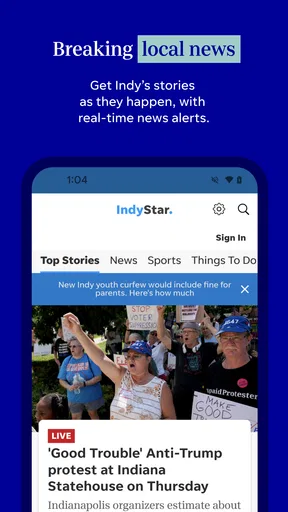
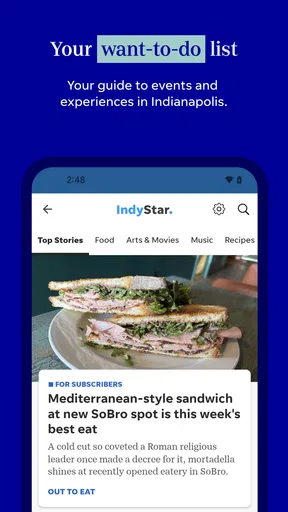
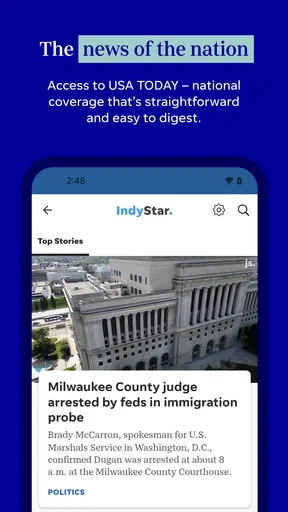
As soon as you open the app, you’re greeted with a clean and straightforward interface. It’s designed to make navigation a breeze, which is a big plus if you're like me and appreciate simplicity in your digital life. The homepage is packed with top stories, and you can easily skim through headlines to find something that piques your interest.
My practical starting point is to treat the home screen as a scan, not a complete briefing. I look over the headlines, choose one story that affects my plans or gives useful local context, and then decide whether I want to read further. That small habit helps keep a local news check from turning into aimless scrolling. If I only have a minute, headlines can orient me; if a story matters, the article itself is where I look for the details.
This distinction matters because a local publication and a broad news aggregator serve different jobs. A national app may be better when I want a wide range of perspectives across the country, while IndyStar is more relevant when the question is what is happening around Indianapolis. I would use the two as complements rather than expect one to replace the other. The trade-off is straightforward: a sharper local lens means less reason to open it for every national or international story.
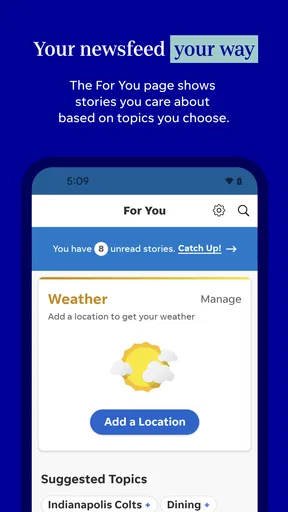
One thing I really appreciate is how the app tailors content to your interests. You can customize notifications and follow specific topics, ensuring you only get the news that matters to you. Whether you're into sports, politics, or local events, IndyStar: Indianapolis Star has got you covered.
For a calmer routine, I would start with the topics I actually check and be selective about alerts. Notifications can make a local app useful when a developing story affects the day, but too many prompts turn a helpful briefing into background noise. A good workflow is to use alerts for genuinely important updates and return to the app on your own schedule for everything else. That division gives me more control than letting every headline interrupt work, a commute, or time with family.
In-Depth Coverage and Features
What sets this app apart is its in-depth coverage of local news. You can access detailed articles that dive deep into the issues affecting Indianapolis. The journalists behind the app are clearly passionate about their work, and it shows in the quality of the content. From investigative pieces to human interest stories, there's a little bit of everything for everyone.
Worth Reading Before You Choose

EA SPORTS FC Mobile 26 Is a Bigger Football Game, but It Takes Time

Flipboard Shows What News Apps Must Do Beyond the Feed

Switching to Android Auto Means Rethinking Your Driving Routine

Google Calendar Makes a Crowded Week Easier to Manage

Ludo King Makes the Most of the Minutes Between Plans

Baby Panda World Brings Quick Play to Modern Phones, but Its Game Library Feels Busy
For me, the value of that depth is strongest when a headline has consequences beyond the day it appears. A quick alert can tell me that something is happening; a longer report can help me understand the people and decisions involved. I would save that reading for a moment when I can focus rather than try to absorb a complicated local issue in fragments between other tasks. The useful outcome is not simply knowing a headline, but having enough context to discuss it or make a practical decision.
And let's not forget about the multimedia features. The app includes plenty of photos and videos to complement the articles. It's not just about reading; it's about experiencing the news in a more engaging way. Plus, if you're someone who spends a lot of time commuting, the audio feature is a lifesaver. You can listen to articles on the go, which is perfect for those hectic mornings.
Audio is most helpful when I can listen without needing to interact with the screen, such as during a walk or while getting ready. I would not treat it as a safe substitute for reading while driving, and any audio option is only useful when the environment makes listening practical. Photos and video can add a sense of place to a local story, but they are extras rather than a reason to expect every article to work well as a short visual update. When time is tight, I choose the format that fits the moment instead of trying to consume everything.
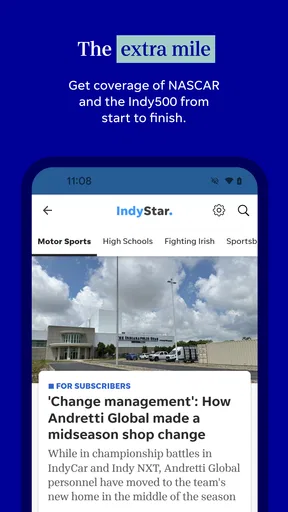
A realistic weekday routine might look like this: I check headlines over breakfast, open a report about a local issue that could affect the day, and use audio later when my hands are occupied but my attention is free. If a sports story is what I care about, I can focus on that topic rather than repeatedly scanning unrelated headlines. The app’s local orientation makes this sequence more useful for an Indianapolis reader than a general feed that gives the city only occasional space.
Stay Updated, Stay Engaged
One of my favorite things about the app is the live updates. If there's breaking news, you’ll be the first to know. The push notifications are timely and relevant, ensuring you’re always in the loop. It's like having a personal news assistant keeping you informed about what’s happening in your city.
I would still separate a notification from a finished account of an event. Breaking coverage can change as a story develops, so I treat an alert as a prompt to check back, not as the entire explanation. That is especially useful when plans depend on local developments: an initial message can tell me to pay attention, while a later visit may offer more context. The handoff from alert to article is the point where I can move from awareness to understanding.
Additionally, the app offers a community section where you can engage with other users. Whether it’s sharing your thoughts on a recent article or participating in local discussions, it’s a great way to connect with fellow Indianapolis residents.
Community discussion can add a useful human reaction to a story, but I keep it distinct from reporting. A comment is someone’s perspective, not a replacement for the article or independent confirmation. I would read the discussion after I understand the main facts, especially on a contentious subject; that order makes it easier to judge what is informed response and what is simply a strong opinion. Readers who prefer news without social interaction can stick to articles and updates instead.
Seamless User Experience
Let's talk about the user experience. The app runs smoothly with minimal lag, which is crucial for keeping users engaged. It's compatible with both Android and iOS, and I've found the performance equally impressive on both platforms. The developers have clearly put a lot of thought into making sure the app is user-friendly and efficient.
It is available free, though in-app purchases range from $19.99 to $69.99 per item. I would check the purchase details shown in the app before committing, and decide whether the reading I want justifies any paid option. If I only need occasional local headlines, I would begin with the free experience and assess how often I return. Regular readers who rely on deeper coverage may evaluate the paid choices differently, but the existence of purchases means “free to download” should not be confused with every possible use being free.
The app is rated Everyone 10+, and its current version is 8.7.1, with Android 8.0 as the minimum operating system requirement. It has been available since August 31, 2012, so it is an established publication app rather than a new experiment. Those details are useful when deciding whether an older device is likely to meet the stated Android requirement or when a parent is checking the age label before installing.
Moreover, the app is frequently updated with new features and improvements. It’s nice to see a commitment to enhancing user experience, as it shows the team behind IndyStar: Indianapolis Star genuinely cares about its users.
Even with a simple interface, the overall experience is not identical for everyone. A modest average rating and a substantial body of user feedback suggest that some readers encounter friction or simply want something different. I would install it with a specific purpose—following Indianapolis reporting—and judge it by whether it helps with that purpose, rather than assuming a clean layout guarantees a perfect fit. If alerts feel excessive, I would adjust the topics and notification choices before abandoning the app; if the main issue is wanting broader coverage, a national source may be the better second app.
Who Gets the Most from a Local Feed
I see the clearest fit for Indianapolis residents who want local reporting in the same place as sports and other city-focused coverage. It can also suit former residents, people with family in the area, and visitors who want more than a general overview while following local developments. The key is having a continuing reason to check Indianapolis news. If a reader rarely cares about the city, the local emphasis that makes this useful to one person can make the feed feel narrow to another.
It is less suited to someone who wants a single app for every topic and location, or who mainly follows national and international affairs. A general aggregator can make it easier to compare headlines from many outlets; a dedicated local publication offers a more focused route into one community. Neither approach is automatically better. I would choose based on whether breadth or local detail is more valuable in my everyday reading, and keep another source for stories outside IndyStar’s natural focus.
It also makes sense for readers who prefer a repeatable routine over constant alerts. I would check the app at a convenient point in the morning, follow up on one or two subjects, and leave the rest until later. That approach helps the app serve as a useful local checkpoint instead of a stream that demands attention all day. Someone who wants every update immediately may prefer a different notification setup or a broader breaking-news service.
Where the Routine Can Falter
The main limitation is not hard to identify: a local-first product will not satisfy every information need, and live updates can encourage a quick reaction before a developing story has settled. I would be cautious about treating the first alert, a headline, or a reader comment as the whole story. Opening the full report and returning as coverage develops takes more time, but it is a better habit when a subject is complicated or consequential.
There is also a real choice between convenience and cost. A free download makes it easy to try, while the presence of in-app purchases means readers should understand what they are selecting before paying. I would not purchase anything simply because a story catches my attention; I would first consider how often I use the app and what the specific option provides. If my needs are occasional, free access may be enough. If I read local reporting often, I would weigh the value against my own budget and reading habits.
For a practical handoff, I might see an alert, open the story when I have time, then share the article or discuss it with someone who lives nearby. The app can support that sequence, but it cannot decide what deserves trust or settle a local debate for me. Readers still need to distinguish reported information from reaction and recognize when a developing story is incomplete. That is not unique to IndyStar, but it is especially important when a push notification compresses a complicated event into a brief prompt.
Before installing, I would ask myself three simple questions: Do I regularly need Indianapolis news? Will I read articles or listen to them often enough to make a dedicated app worthwhile? And am I comfortable checking purchase options if I want more than the free experience? If the answers point toward frequent local use, the app has a clear role. If I mainly want a broad mix of outlets or only check city news once in a while, a general news reader may be the more efficient choice.
A Useful Local Companion, With Clear Limits
All in all, if you're living in Indianapolis or simply have an interest in the area, downloading the IndyStar: Indianapolis Star app is a no-brainer. It’s packed with features that keep you informed, engaged, and connected to your community. Plus, with the ability to customize your news feed, you get a personalized experience that’s hard to beat.
So, if you’re ready to stay informed about all things Indianapolis, give this app a try. Trust me, you won’t regret it!
My recommendation is a little more specific: try it if local Indianapolis coverage is a regular part of your day, and use the first few visits to shape a manageable mix of topics and alerts. The app’s strongest role is as a focused local companion, with articles, updates, sports, and audio supporting different moments in a reader’s routine. Keep a broader news source for subjects beyond the city, and make your own call about paid options only after seeing how often you return. Used that way, it can make staying connected to Indianapolis feel convenient without pretending one local app has to do every news job.
Pros
- Clean and intuitive user interface.
- Timely updates on local news.
- Customizable notification settings.
- In-depth investigative reports.
- Easy navigation between sections.
Cons
- Frequent ads can be intrusive.
- Occasional crashes on older devices.
- Limited free articles monthly.
- Requires account for full access.
- Heavy on storage space.
FAQs for IndyStar: Indianapolis Star
What features does the IndyStar app offer?
The IndyStar app provides a comprehensive news experience with real-time updates, personalized news feeds, and easy navigation. Users can access local and national news, sports updates, weather forecasts, and opinion pieces. The app also allows for push notifications, ensuring you stay informed on breaking news.
Is the IndyStar app free to use?
The IndyStar app is free to download, but it offers a mix of free and subscription-based content. While some articles and features are accessible without a subscription, premium content requires a paid subscription. This model ensures users can enjoy basic news access while supporting in-depth journalism.
Does the IndyStar app support offline reading?
Yes, the IndyStar app offers offline reading capabilities. Users can save articles to read later when they are not connected to the internet. This feature is particularly useful for commuters or users with limited data plans, allowing them to stay informed at their convenience.
How often is the content updated on the IndyStar app?
Content on the IndyStar app is updated continuously throughout the day. The app is designed to provide real-time news updates, ensuring users have access to the latest stories. Push notifications also help alert users to significant breaking news as it happens.
Can I customize my news feed in the IndyStar app?
Yes, the IndyStar app allows users to customize their news feeds. This feature lets you select your preferred topics and sections, ensuring the app delivers news that matches your interests. Customization enhances user experience by prioritizing content that is most relevant to each individual.


